Smartphones have become an essential part of modern life. We use them for communication, online banking, social media, gaming, education, business, navigation, photography, and entertainment. Because our phones perform so many important tasks every day, battery life has become one of the biggest concerns for Android users. Running out of battery at the wrong time can interrupt work, cause missed calls, delay important messages, and even create emergency situations. For this reason, many users look for smart battery management tools that provide better control over charging and battery monitoring.
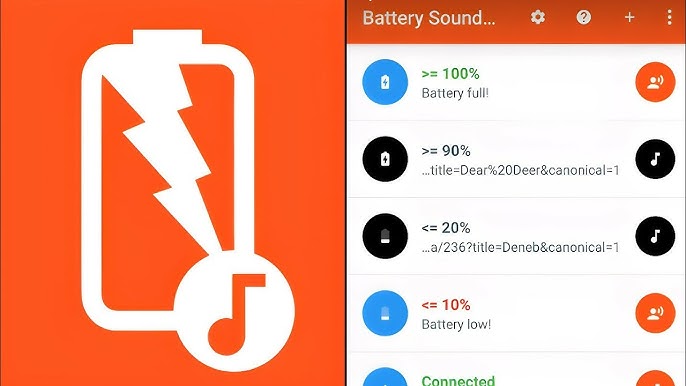
One of the most useful tools available for Android devices is the Battery Sound Notification App. This application provides customizable sound alerts, voice notifications, battery percentage announcements, charging reminders, and battery health monitoring. Instead of checking your phone repeatedly to see whether charging has started or whether the battery is fully charged, the app automatically informs you through audio notifications.
Whether you are charging your phone overnight, working at your desk, driving your car, studying, gaming, or watching videos, the Battery Sound Notification app ensures that you always know your battery status without unlocking your phone.
This comprehensive guide explains everything about Battery Sound Notification apps, including their features, benefits, installation process, customization options, battery health tips, practical uses, privacy considerations, and why they have become one of the most downloaded battery utility apps for Android users.
What Is a Battery Sound Notification App?
A Battery Sound Notification app is an Android utility application designed to monitor your device’s battery status in real time and provide instant audio alerts whenever a battery-related event occurs.
Instead of relying only on the small battery icon in the status bar, the app plays customizable sounds or voice announcements whenever important battery events happen.
Common battery events include:
- Charger connected
- Charger disconnected
- Battery fully charged
- Low battery warning
- Battery percentage reached
- Fast charging detected
- Charging interrupted
- High battery temperature
- Low battery temperature
Many modern Battery Sound Notification apps also support voice announcements using Text-to-Speech technology, allowing your phone to verbally announce battery information.
Why Should You Use a Battery Sound Notification App?
Most Android smartphones provide only basic battery notifications. Some devices vibrate briefly when charging begins, while others only display a charging animation.
However, these notifications can easily be missed.
A Battery Sound Notification app solves this problem by providing loud sound alerts, custom music, voice announcements, and charging reminders that are impossible to overlook.
This becomes especially useful when:
- Your phone is charging in another room.
- You are working on a computer.
- You are watching television.
- You are sleeping.
- You are driving.
- Your phone screen is turned off.
Instead of checking your phone repeatedly, the app keeps you informed automatically.
Key Features of Battery Sound Notification App
Charging Connected Alert
One of the most useful features is the charging connected notification.
As soon as you connect the charging cable, the app immediately plays:
- Notification sound
- Alarm tone
- Voice announcement
- Custom ringtone
- Music file
This confirms that charging has successfully started.
Charging Disconnected Alert
Sometimes charging cables become loose accidentally.
The Battery Sound Notification app immediately detects charger removal and alerts you before your battery starts draining.
This feature is particularly useful when using power banks, car chargers, or public charging stations.
Battery Full Notification
Many users forget to disconnect their charger after reaching 100%.
Although modern smartphones include charging protection systems, leaving your device plugged in continuously may still generate unnecessary heat.
The app alerts you immediately when charging reaches:
- 100%
- 95%
- 90%
- 85%
- 80%
Users can choose any percentage according to their preferences.
Low Battery Warning
Nobody likes seeing their phone suddenly switch off.
Battery Sound Notification apps allow users to receive early warnings at:
- 30%
- 20%
- 15%
- 10%
- 5%
These alerts provide enough time to locate a charger.
Voice Announcements
Many Battery Notification apps support spoken battery updates.
Examples include:
“Charging Started.”
“Battery Fully Charged.”
“Battery Level is 80 Percent.”
“Please Connect Your Charger.”
“Battery Temperature is High.”
Voice notifications are especially useful while driving or when your phone is not nearby.
Custom Notification Sounds
Users can personalize every battery event.
Choose from:
- Alarm sounds
- Notification tones
- Favorite songs
- MP3 files
- Voice recordings
- System ringtones
Each battery event can have its own unique sound.
Battery Percentage Alerts
Rather than receiving notifications only at 100%, users can select custom battery percentages.
Popular choices include:
- 25%
- 50%
- 75%
- 80%
- 90%
- 95%
This feature helps users follow healthy charging habits.
Battery Temperature Monitoring
Heat is one of the biggest enemies of lithium-ion batteries.
Battery Sound Notification apps continuously monitor battery temperature.
If the temperature becomes too high, users receive an immediate warning.
This helps prevent battery damage.
Charging Speed Detection
Many apps display charging information such as:
- Fast Charging
- Normal Charging
- Slow Charging
Users can compare different chargers and cables.
Battery Health Information
Some advanced apps estimate battery health by monitoring:
- Charge cycles
- Battery capacity
- Charging efficiency
- Voltage
- Temperature
- Charging habits
These statistics help users understand battery aging.
Benefits of Battery Sound Notification App
Using a Battery Sound Notification app provides many advantages.
Prevents Overcharging
Users receive instant alerts when charging reaches the desired percentage.
Extends Battery Life
Charging between 20% and 80% is considered healthier for lithium-ion batteries.
Custom alerts help users follow this practice.
Saves Time
No need to unlock your phone repeatedly.
The app automatically announces important battery events.
Better Charging Safety
Users immediately know if charging has stopped unexpectedly.
Improves Battery Awareness
Real-time notifications encourage healthier charging habits.
Custom User Experience
Every sound can be personalized according to user preference.
Who Should Use This App?
Battery Sound Notification apps are useful for almost everyone.
Including:
- Students
- Teachers
- Office workers
- Gamers
- Travelers
- Business professionals
- Drivers
- Senior citizens
- Android enthusiasts
- Content creators
Anyone who charges their phone regularly can benefit.
How to Install Battery Sound Notification App
Installing the app is simple.
Step 1
Open Google Play Store.
Step 2
Search for Battery Sound Notification.
Step 3
Choose a trusted application.
Step 4
Tap Install.
Step 5
Open the app.
Step 6
Grant the necessary permissions.
Step 7
Configure:
- Charging sound
- Battery full alert
- Low battery warning
- Voice notifications
- Battery percentage reminders
Step 8
Save your settings.
The app now automatically monitors your battery.
Tips to Improve Battery Health
Besides using Battery Sound Notification apps, follow these recommendations:
- Avoid exposing your phone to extreme heat.
- Use original chargers.
- Avoid completely draining the battery every day.
- Charge between 20% and 80% whenever possible.
- Close unnecessary background applications.
- Reduce screen brightness.
- Enable Battery Saver mode.
- Update your Android software regularly.
- Avoid using heavy games while charging.
- Keep your charging port clean.
These habits significantly improve battery lifespan.
Privacy and Security
Battery Sound Notification apps generally require minimal permissions.
Most apps only request:
- Notification access
- Battery optimization permission
- Audio permission (for custom sounds)
- Foreground service permission
Always install apps from trusted developers to protect your privacy.
Common Problems and Solutions
Charging Alert Not Working
Check notification permissions and disable battery optimization for the app.
Voice Notification Missing
Enable Text-to-Speech services in Android settings.
Custom Sound Not Playing
Verify that the selected audio file still exists on your device.
Battery Percentage Incorrect
Restart the phone or recalibrate the battery if necessary.
Final Thoughts
The Battery Sound Notification App is one of the most practical Android utility applications for users who want better control over charging and battery health. By providing real-time charging alerts, low battery warnings, battery full notifications, voice announcements, custom sounds, charging speed information, and battery temperature monitoring, it transforms the way users manage their smartphones.
Whether you are a student, professional, gamer, traveler, or everyday Android user, this app helps prevent overcharging, improves battery awareness, and makes charging more convenient. With its easy-to-use interface and powerful customization options, Battery Sound Notification has become an essential companion for anyone looking to protect their device and extend battery life.