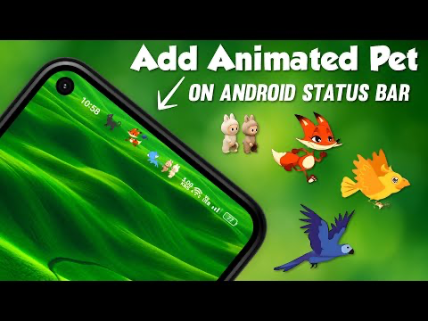
Barpie: Status Bar, Notch Pets – A Fun Way to Personalize Your Smartphone
Smartphones have become a huge part of our daily lives, but let’s be honest — most phones look and feel the same after a while. The same icons, same status bar, and same boring interface can make your device feel dull. But what if you could turn your phone into something fun, unique, and full of personality?
That’s where Barpie: Status Bar, Notch Pets comes in — a creative and entertaining app that transforms your smartphone’s notch and status bar into something lively and exciting.
What is Barpie: Status Bar, Notch Pets?
Barpie is a customization app designed to make your phone’s status bar and notch area interactive and fun. Instead of just showing time, battery, and signals, Barpie adds cute animated pets and visual effects that live right on your screen.
These “notch pets” move, react, and sometimes even play around your screen, giving your device a fresh and unique look.
Why Barpie is So Popular
Barpie is gaining popularity because it mixes customization with entertainment. Unlike traditional themes or launchers, this app adds life to your screen in a playful way.
Here’s why users love it:
- Makes your phone look unique
- Adds fun animations to the notch area
- Easy to use with simple controls
- Doesn’t require deep technical knowledge
- Works smoothly on most Android devices
Key Features of Barpie App
1. Notch Pets (Cute Animated Characters)
The main highlight of Barpie is its adorable animated pets. These pets sit around your notch or status bar and move naturally on your screen.
- Cats, dogs, and other cute creatures
- Smooth animations
- Interactive movements
2. Status Bar Customization
Barpie allows you to customize your status bar in creative ways:
- Add effects and overlays
- Change visual styles
- Make your phone stand out
3. Interactive Experience
The pets are not just static icons — they react and move, making your phone feel alive.
4. Lightweight and Easy to Use
The app is simple, user-friendly, and doesn’t slow down your device.
5. Personalization Options
You can choose different pets, styles, and behaviors according to your preference.
How to Use Barpie App (Step-by-Step Guide)
Using Barpie is very simple. Just follow these steps:
Step 1: Install the App
Download Barpie from the Google Play Store.
Step 2: Open the App
Launch the app and allow necessary permissions (like overlay access).
Step 3: Choose Your Pet
Select your favorite notch pet from the available options.
Step 4: Customize Settings
Adjust size, speed, and position of the pet.
Step 5: Activate
Turn on the feature and enjoy your animated status bar.
Why You Should Try Barpie
If you are bored with your phone’s default look, Barpie is a perfect solution. It offers:
- Fun and entertainment
- Unique customization
- A fresh user experience
- A creative way to express your personality
Is Barpie Safe to Use?
Yes, Barpie is generally safe if downloaded from the official Play Store. However:
- Only allow necessary permissions
- Avoid downloading from unknown websites
- Keep the app updated
Limitations of Barpie
While the app is fun, it has a few minor drawbacks:
- May consume a little extra battery
- Some features may be locked behind ads
- Not all devices support notch customization
Final Thoughts
Barpie: Status Bar, Notch Pets is a fun and creative app that brings life to your smartphone. Instead of a boring status bar, you get a lively and interactive experience with cute animated pets.
If you love customizing your phone and want something different, Barpie is definitely worth trying. It’s simple, entertaining, and adds a unique charm to your device
DownloadDownload