Speaker Cleaner APK – Complete Guide, Features, Benefits & How It Works
Introduction
Smartphones have become an essential part of our daily lives. We use them for calls, music, videos, gaming, online meetings, and social media. However, one of the most common smartphone problems occurs when water, moisture, dust, or debris enters the speaker grille. As a result, the speaker may sound muffled, distorted, crackly, or significantly quieter than normal.
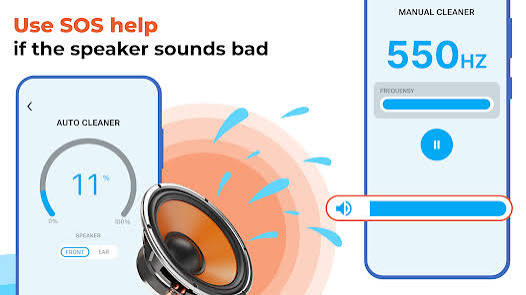
Fortunately, Speaker Cleaner APK offers a simple solution. These applications use specially designed sound frequencies to vibrate the phone speaker and help remove trapped water and dust without opening the device or visiting a repair center.
This guide explains everything you need to know about Speaker Cleaner APK, including how it works, its features, benefits, installation process, usage tips, and safety precautions.
What Is Speaker Cleaner APK?
Speaker Cleaner APK is an Android application designed to clean smartphone speakers using sound vibration technology.
The app generates specific audio frequencies that cause the speaker membrane to vibrate rapidly. These vibrations help push water droplets, dust particles, and debris out of the speaker grille.
The technology works similarly to the water ejection feature found in smartwatches, including the Apple Watch, which uses sound waves to remove water after swimming or exposure to moisture.
Instead of physically opening your device, Speaker Cleaner APK allows users to clean speakers safely using software-based methods.
Why Speaker Problems Occur
Several situations can affect speaker performance:
- Accidental water splashes
- Rain exposure
- High humidity environments
- Dust accumulation
- Pocket lint buildup
- Beach sand particles
- Sweat during workouts
When moisture or debris enters the speaker opening, sound quality can decrease dramatically.
Common symptoms include:
- Low speaker volume
- Distorted sound
- Crackling noises
- Muffled audio
- Complete loss of sound
Speaker Cleaner APK helps address these issues quickly.
How Speaker Cleaner APK Works
The app uses carefully selected sound frequencies to create strong vibrations within the speaker.
The cleaning process works through:
Speaker Membrane Vibration
The speaker membrane moves rapidly when the cleaning tone plays.
This movement pushes trapped water toward the speaker opening.
Air Pressure Movement
Rapid vibrations generate airflow inside the speaker chamber.
The airflow helps carry water droplets and dust particles outward.
Surface Tension Breakdown
Water often remains trapped due to surface tension.
Repeated sound vibrations break this tension and encourage water removal.
Dust Removal
The same vibration mechanism loosens dust and debris stuck inside the speaker grille.
Key Features of Speaker Cleaner APK
Water Ejection Mode
The primary feature of the app.
A specially designed cleaning frequency pushes water out of the speaker.
Most cleaning sessions last between 10 and 30 seconds and can be repeated multiple times for better results.
Multiple Frequency Options
Different frequencies produce different vibration patterns.
Many apps provide:
- 165 Hz cleaning mode
- 250 Hz cleaning mode
- 350 Hz cleaning mode
- 500 Hz cleaning mode
Using multiple frequencies improves cleaning effectiveness.
Automatic Volume Maximization
Most Speaker Cleaner apps automatically increase the speaker volume to maximum during cleaning.
Higher volume creates stronger membrane movement and more effective water removal.
After cleaning, the original volume level is restored automatically.
Dust Cleaning Function
Some apps include a separate dust cleaning mode.
This mode uses extended vibration cycles to loosen dirt, lint, and debris trapped inside the speaker mesh.
Speaker Testing Tool
Many apps include audio testing features.
Users can test:
- Speaker volume
- Audio clarity
- Left and right speaker balance
- Frequency response
before and after cleaning.
Visual Sound Wave Animation
A visual waveform display shows that the cleaning process is active.
Many apps also include:
- Progress indicators
- Cleaning timers
- Frequency displays
to improve user experience.
Multi-Speaker Support
Modern smartphones often contain:
- Bottom speakers
- Earpiece speakers
- Stereo speakers
Advanced cleaner apps support all speaker types separately.
Benefits of Using Speaker Cleaner APK
Restores Sound Quality
The biggest benefit is improved audio performance.
Users often notice:
- Louder sound
- Clearer audio
- Reduced distortion
- Better bass response
after cleaning.
Saves Repair Costs
Instead of visiting a repair shop for minor water exposure, users can attempt speaker cleaning at home.
This saves both time and money.
Easy to Use
Most apps require only one tap.
Users do not need technical knowledge to operate the application.
Fast Results
Cleaning cycles usually take less than one minute.
Many users see immediate improvements after only a few cleaning sessions.
No Hardware Disassembly
The app works without opening the phone.
This reduces the risk of accidental hardware damage.
How to Download Speaker Cleaner APK
Installing the app is straightforward.
Step 1
Open Google Play Store.
Step 2
Search for:
- Speaker Cleaner
- Speaker Cleaner Remove Water
- Fix My Speakers
- Clear Wave
Step 3
Choose a trusted application with good ratings.
Step 4
Tap Install.
Step 5
Launch the application.
How to Use Speaker Cleaner APK
Step 1 – Remove Your Phone Case
Phone cases may block speaker openings.
Remove the case before cleaning.
Step 2 – Position the Phone Correctly
Hold the device so the speaker faces downward.
Gravity helps water exit more effectively.
Step 3 – Start Cleaning
Tap the Clean Speaker button.
The app will begin playing cleaning frequencies automatically.
Step 4 – Watch for Water Droplets
You may notice small droplets emerging from the speaker grille.
This indicates that the cleaning process is working.
Step 5 – Wipe the Speaker Area
Use a soft dry cloth to remove expelled moisture.
Avoid inserting anything into the speaker opening.
Step 6 – Repeat Several Times
For best results:
Run 3–5 cleaning cycles.
Heavy water exposure may require additional cycles.
Step 7 – Test the Speaker
Play music or a video after cleaning.
Check whether:
- Volume improves
- Distortion decreases
- Audio sounds clearer
Best Practices for Speaker Cleaning
Act Quickly
Run the cleaning process immediately after water exposure.
The sooner you start, the better the results.
Use Maximum Volume
Cleaning frequencies are most effective at high volume levels.
Do not reduce the volume during cleaning.
Try Multiple Frequencies
Different frequencies affect water in different ways.
Running several cleaning modes improves success rates.
Allow Natural Drying
After cleaning:
Leave the phone in a dry environment for 2–4 hours.
This helps any remaining moisture evaporate.
Avoid Heat Sources
Do not use:
- Hair dryers
- Heat guns
- Ovens
- Direct sunlight
Excessive heat can damage internal phone components.
Common Problems Solved by Speaker Cleaner APK
Muffled Speaker Sound
Cleaning frequencies remove trapped water that blocks sound output.
Low Volume
Dust and moisture often reduce speaker volume significantly.
Crackling Audio
Water droplets can cause distortion and crackling noises.
Uneven Sound Quality
Cleaning helps restore balanced audio performance.
Dust Buildup
Regular maintenance removes accumulated dirt and debris.
Popular Speaker Cleaner Apps
Speaker Cleaner – Remove Water
A simple one-tap solution with millions of downloads.
Fix My Speakers
Offers multiple cleaning frequencies and speaker testing tools.
Clear Wave
Combines water ejection technology with sound quality diagnostics.
Speaker Cleaner Pro
Provides advanced cleaning modes and detailed speaker testing.
Safety Tips
While Speaker Cleaner APK is generally safe, users should:
- Download only from trusted sources.
- Avoid excessive cleaning cycles.
- Never insert objects into the speaker grille.
- Keep devices away from additional moisture.
- Back up important data after major water exposure.
Advantages of Speaker Cleaner APK
- Easy to use
- Fast cleaning process
- Restores speaker quality
- No hardware disassembly required
- Saves repair costs
- Works on most Android devices
- Free options available
- Supports water and dust removal
Disadvantages of Speaker Cleaner APK
- Cannot fix physically damaged speakers
- Severe water damage may require professional repair
- Results vary between devices
- Some apps contain advertisements
- Not all speakers respond equally to cleaning frequencies
Who Should Use Speaker Cleaner APK?
Speaker Cleaner APK is ideal for:
- Smartphone users exposed to rain
- Beach visitors
- Outdoor workers
- Mobile gamers
- Content creators
- Students
- Anyone experiencing muffled speaker audio
Future of Speaker Cleaning Technology
As smartphone technology evolves, future cleaning apps may include:
- AI-powered speaker diagnostics
- Automatic water detection
- Advanced frequency optimization
- Integrated hardware cleaning support
- Real-time speaker health monitoring
These improvements could make speaker maintenance even more effective.
Conclusion
Speaker Cleaner APK is one of the simplest and most effective solutions for removing water and dust from smartphone speakers. By using specially designed sound frequencies, these apps help restore audio quality without requiring repairs or hardware disassembly.
Whether your phone has been exposed to rain, accidental splashes, or dust buildup, Speaker Cleaner APK can often restore speaker performance within minutes. Combined with proper drying techniques and regular maintenance, it can help keep your smartphone sounding clear and loud for years to come.
If you notice muffled or distorted audio, a reliable Speaker Cleaner app is definitely worth trying before considering expensive repair options.