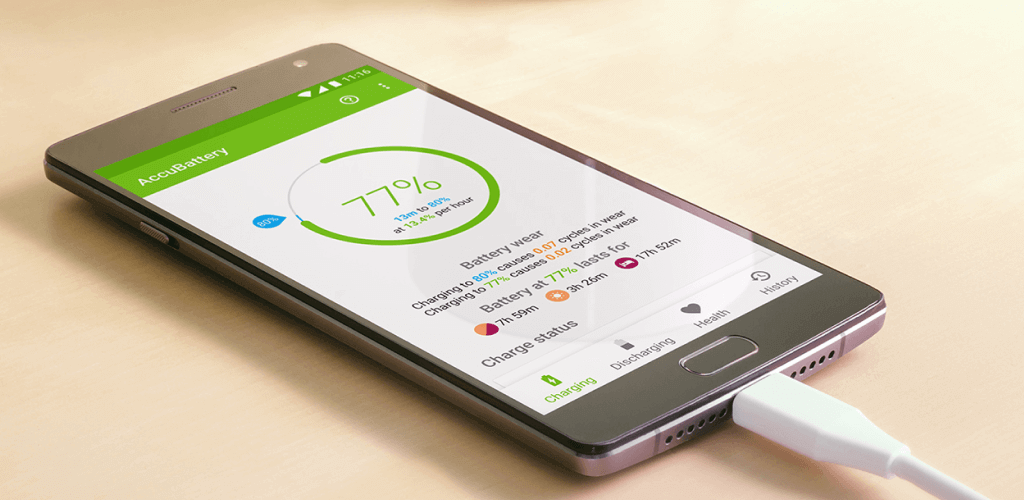
AccuBattery APK – Complete Guide to Monitor Battery Health on Android
Introduction
Battery life is one of the most important aspects of any smartphone. Over time, every battery naturally loses capacity, resulting in shorter backup time and slower performance. If you want to monitor your battery’s health, charging speed, temperature, and overall performance, AccuBattery is one of the best Android apps available.
AccuBattery helps users understand the actual condition of their battery by measuring charging sessions, estimating battery wear, and providing detailed statistics. Whether you want to extend your phone’s battery lifespan or simply monitor charging performance, this app offers valuable insights for both casual users and tech enthusiasts.
What is AccuBattery?
AccuBattery is a battery health monitoring application developed by Digibites for Android devices. Unlike ordinary battery apps that only display the remaining battery percentage, AccuBattery analyzes charging and discharging behavior to estimate your battery’s real capacity.
The app measures:
- Battery Health
- Battery Capacity (mAh)
- Charging Speed
- Discharge Rate
- Battery Temperature
- Voltage
- Screen-on Time
- Power Consumption
It provides detailed statistics that help users improve battery longevity through smarter charging habits.
Key Features of AccuBattery
1. Battery Health Monitoring
One of AccuBattery’s biggest advantages is its battery health analysis.
The app compares your battery’s current capacity with its original factory capacity.
You can easily see:
- Current battery health
- Battery wear percentage
- Estimated remaining lifespan
- Charging cycles
This helps determine whether your battery is still in good condition or needs replacement.
2. Accurate Battery Capacity Measurement
AccuBattery calculates your battery’s real capacity in mAh (milliamp-hours).
For example:
- Factory Capacity: 5000 mAh
- Current Capacity: 4550 mAh
This indicates your battery health is approximately 91%.
The app becomes more accurate after several charging sessions.
3. Charging Speed Monitor
AccuBattery displays live charging information including:
- Charging current (mA)
- Charging voltage
- Charging power
- Estimated charging time
- Fast charging status
This allows users to compare chargers, USB cables, and charging adapters.
4. Battery Usage Analysis
The app tracks battery consumption in real time.
You can monitor:
- Screen-on battery usage
- Screen-off drain
- Background app consumption
- Average battery life
This helps identify apps that consume excessive battery power.
5. Charging Alarm
One of the most useful features is the charging alarm.
Experts recommend charging lithium-ion batteries only up to 80% for maximum lifespan.
AccuBattery allows you to:
- Set charging limits
- Receive notifications at selected percentages
- Avoid unnecessary overcharging
6. Battery Temperature Monitoring
High temperatures reduce battery lifespan.
AccuBattery continuously monitors:
- Battery temperature
- Charging temperature
- Overheating alerts
This helps prevent damage caused by excessive heat.
7. Voltage Monitoring
The app displays battery voltage in real time.
Voltage information helps users understand charging efficiency and battery performance.
8. Battery History
AccuBattery stores historical charging data.
Users can view:
- Charging sessions
- Battery wear over time
- Temperature history
- Charging speed trends
- Battery health graphs
9. Detailed Statistics
The Statistics section provides:
- Daily battery usage
- Average screen-on time
- Standby drain
- Charging efficiency
- Estimated battery lifespan
These insights help improve overall battery management.
Benefits of Using AccuBattery
Extend Battery Life
Proper charging habits can significantly increase battery lifespan.
Detect Battery Problems
Identify battery degradation before it becomes serious.
Compare Chargers
Test different chargers and cables to find the fastest combination.
Save Money
Knowing your battery’s health can help determine whether replacement is necessary.
Improve Phone Performance
Healthy batteries contribute to better overall device performance.
How to Download AccuBattery
Method 1: Google Play Store (Recommended)
- Open Google Play Store.
- Search for AccuBattery.
- Select the app developed by Digibites.
- Tap Install.
- Open the app after installation.
This is the safest and most reliable installation method.
Method 2: APK Installation
If the app is unavailable in your region:
- Download the APK from a trusted source.
- Enable Install Unknown Apps in Android settings.
- Open the downloaded APK.
- Install the application.
- Launch the app.
Only use trusted APK sources to reduce security risks.
How to Use AccuBattery
Step 1
Open the app.
Step 2
Grant the required permissions.
Step 3
Charge your phone normally.
Step 4
Allow several complete charging sessions.
Step 5
Check the Health section.
Step 6
View:
- Battery Capacity
- Battery Health
- Charging Speed
- Temperature
- Discharge Rate
The more charging sessions the app records, the more accurate the results become.
Charging Alarm Setup
To maximize battery lifespan:
- Open Charging.
- Enable Charging Alarm.
- Set the target to 80%.
- Disconnect the charger when the alarm sounds.
This simple habit can help reduce long-term battery wear.
Battery Health Tips
AccuBattery recommends:
- Avoid charging to 100% every time.
- Keep battery temperature below 40°C.
- Avoid complete battery drain.
- Use original chargers whenever possible.
- Remove thick phone cases while charging if overheating occurs.
- Avoid charging overnight frequently.
AccuBattery vs Other Battery Apps
AccuBattery
- Excellent battery health analysis
- Accurate capacity estimation
- Charging alarm
- Battery wear tracking
Ampere
- Best for charging current testing
- Simple interface
- Limited battery health features
Battery Guru
- Good battery statistics
- Charging recommendations
- Nice user interface
GSam Battery Monitor
- Advanced battery analysis
- App-level battery usage
- Better for experienced users
AccuBattery remains one of the best choices for long-term battery monitoring.
Pros
- Accurate battery health estimation
- Easy-to-use interface
- Charging alarm
- Charging speed monitoring
- Temperature tracking
- Battery usage analysis
- Historical statistics
- Lightweight application
- Free version available
Cons
- Capacity estimates require several charging sessions.
- Some advanced features require the Pro version.
- APK versions from unofficial websites may be unsafe.
- Accuracy depends on device hardware.
Is AccuBattery Safe?
Yes. The official version from the Google Play Store is considered safe and widely trusted.
For maximum security:
- Download only the official app.
- Avoid modified APKs.
- Do not install apps from unknown websites.
- Keep the app updated.
Who Should Use AccuBattery?
AccuBattery is ideal for:
- Android users
- Mobile gamers
- Heavy smartphone users
- Phone repair technicians
- Tech enthusiasts
- Anyone wanting to extend battery life
Final Verdict
AccuBattery is one of the most reliable battery health monitoring apps available for Android. Its ability to estimate battery capacity, monitor charging speed, analyze battery wear, and provide detailed statistics makes it an essential tool for anyone who wants to maximize battery performance and longevity.
Whether you’re troubleshooting battery issues or simply looking to improve charging habits, AccuBattery offers valuable insights backed by accurate data.
Conclusion
AccuBattery helps users understand how their smartphone battery performs over time. With features such as battery health monitoring, charging alarms, temperature tracking, discharge analysis, and historical reports, it provides everything needed to maintain a healthy battery. For the safest experience, install the official version from the Google Play Store and use it regularly to monitor your device’s battery health.